How to Set Up and Optimize Your LinkedIn Profile the Smart Way

In the digital age, your LinkedIn profile is much more than an online resume; it's a powerful tool for networking, personal branding, and even business development. With the professional world continuously evolving, it’s crucial to keep your profile up-to-date and strategically optimized for latest standards.
This article will guide you through setting up a LinkedIn profile that will help you stand out in a competitive job market and make meaningful connections.
How to Sign Up on LinkedIn
If you are entirely new to LinkedIn, setting up your account is simple and takes only a few minutes. Follow these steps to get started:
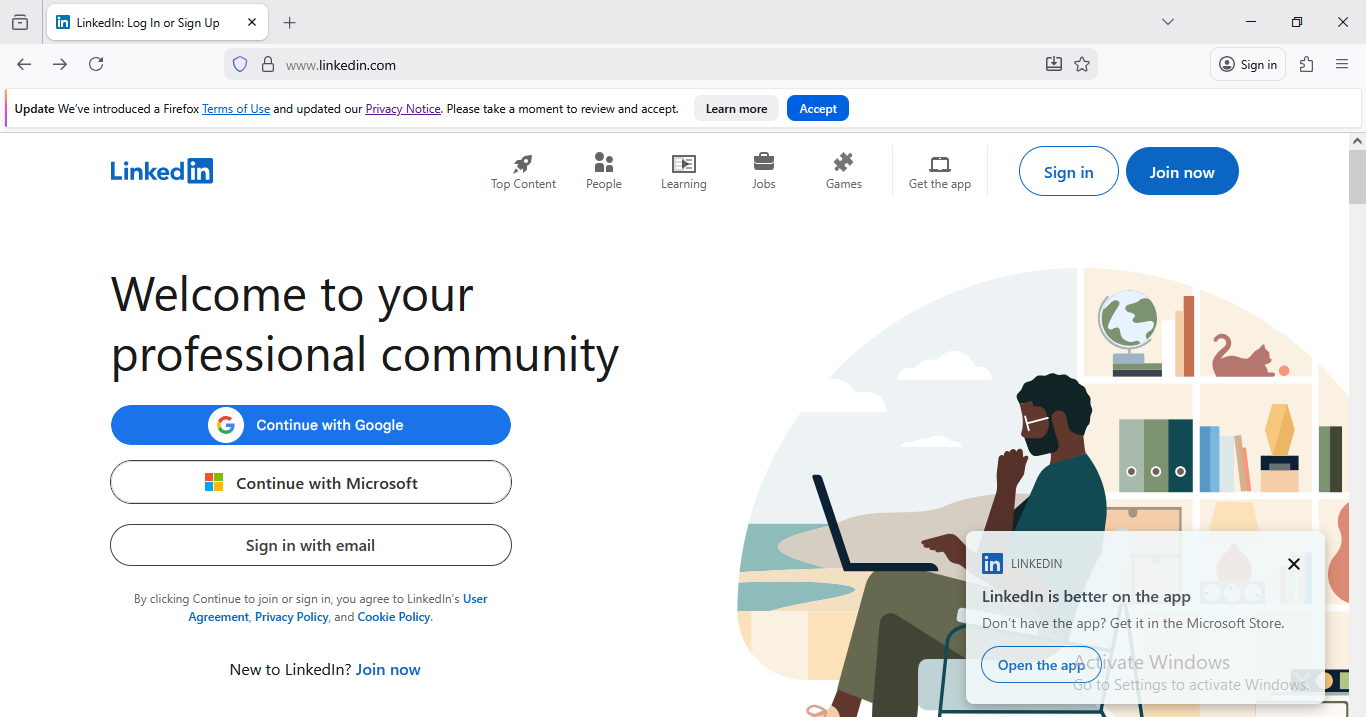
step 1. Go to www.linkedin.com on your browser or download the LinkedIn app from the Google Play Store (Android) or Apple App Store (iPhone).
step 2. On the homepage, you will see a button that says, “Join now.” Click it to begin creating your account.
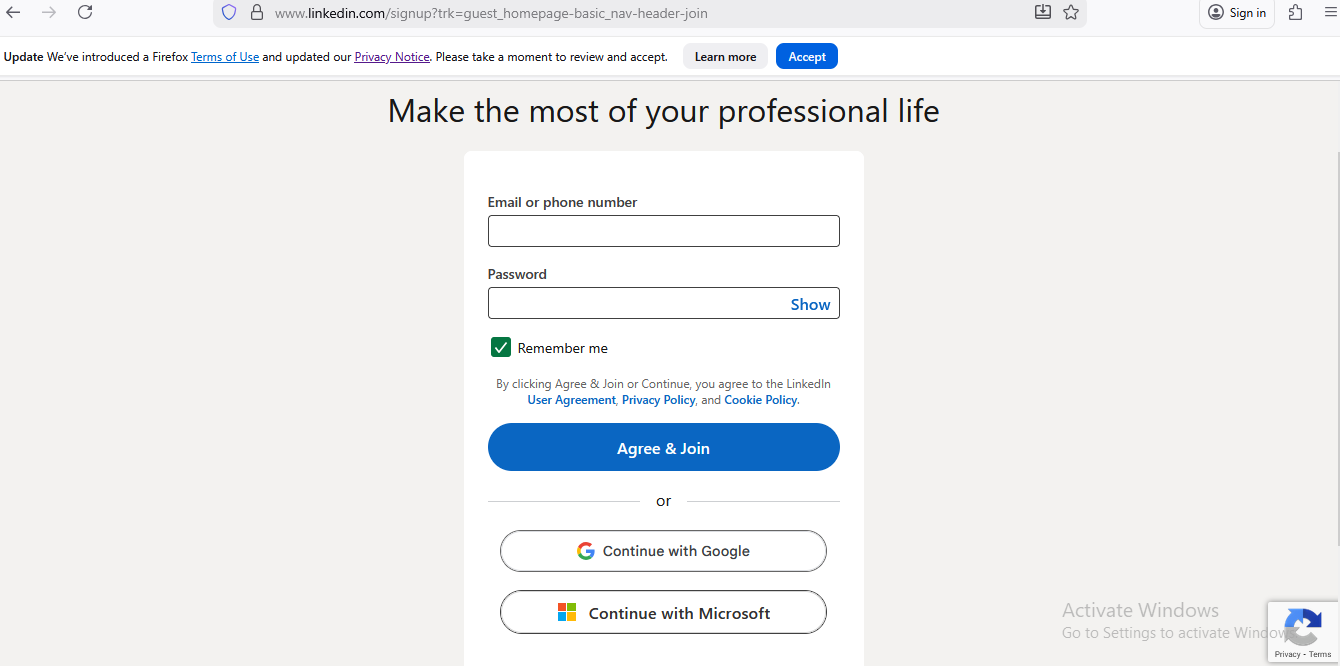
step 3. Enter Your Basic Information
You will be asked to provide:
Your email address (preferably a professional one)
A secure password
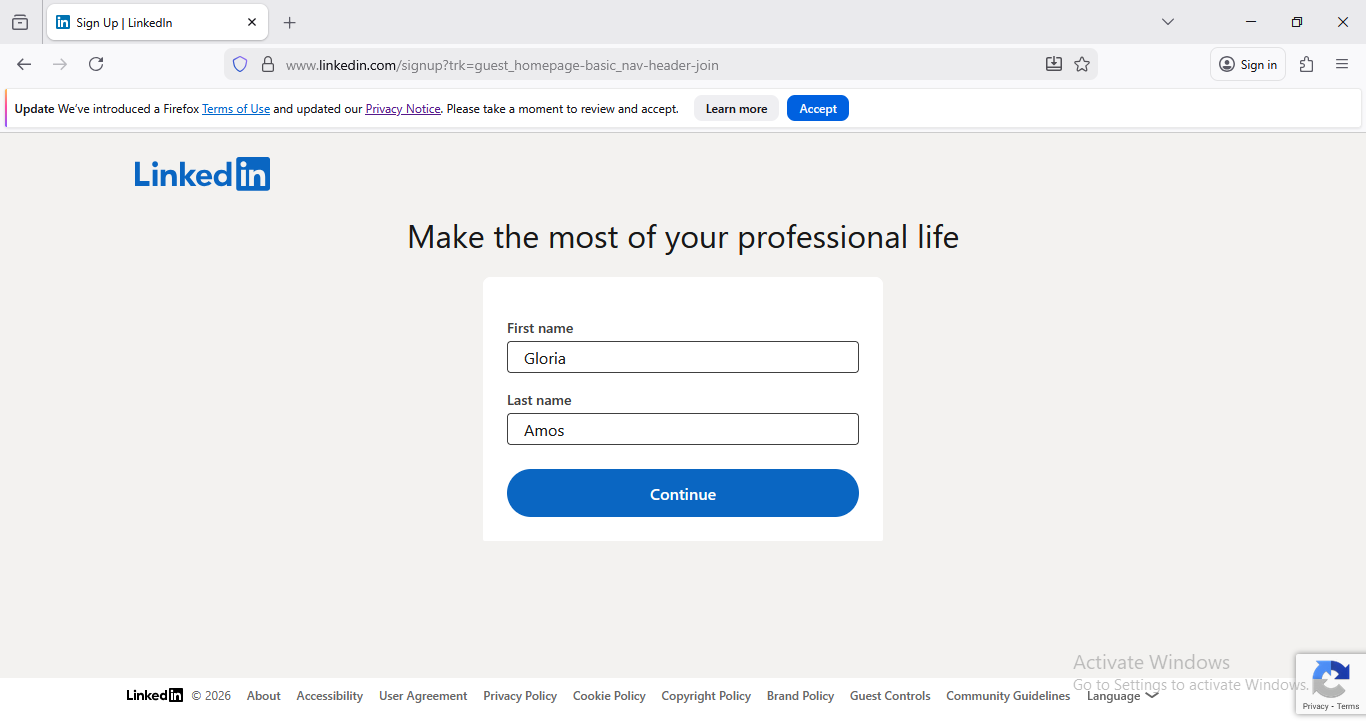
- after which you have to provide your first and last names
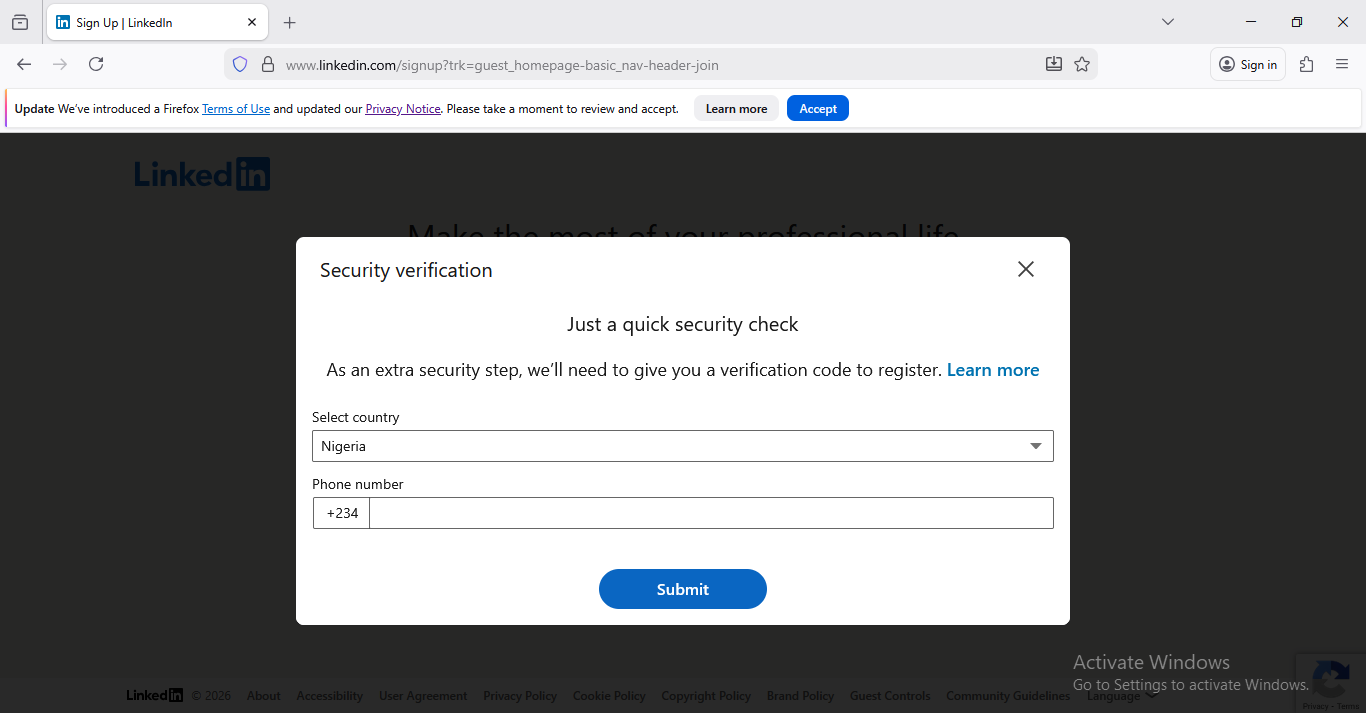
Verify Your Email or Phone Number
LinkedIn will send you a verification code to your email (or phone, if you choose that option).
Enter the code to confirm your account.
Set Up Your Profile Basics
LinkedIn will guide you through a few initial questions such as:
Your location
Whether you are a student, job seeker, or working professional
Your current job title or field
Fill these in honestly
Professional, High-Quality Profile Picture
Your profile picture is the first thing people notice on LinkedIn. High-quality, authentic profile pictures are essential. Avoid overly formal photos; instead, opt for something approachable but professional.
Tips:
Lighting is key: Natural lighting or soft light will ensure a polished look.
Background: Choose a simple, neutral background that doesn’t distract from your face.
Dress smartly: Wear attire that represents your industry, whether that's casual or business formal.
Craft a Captivating Headline
Your headline is one of the most visible elements on your LinkedIn profile and should showcase more than just your job title. Use a headline that clearly defines who you are, what you do, and the value you bring.
Tips:
Include keywords relevant to your industry for better discoverability.
Mention a key accomplishment or specialization to attract attention.
Consider adding a personal touch or passion, such as “Tech Innovator | Helping Startups Scale | Passionate About Sustainability.”
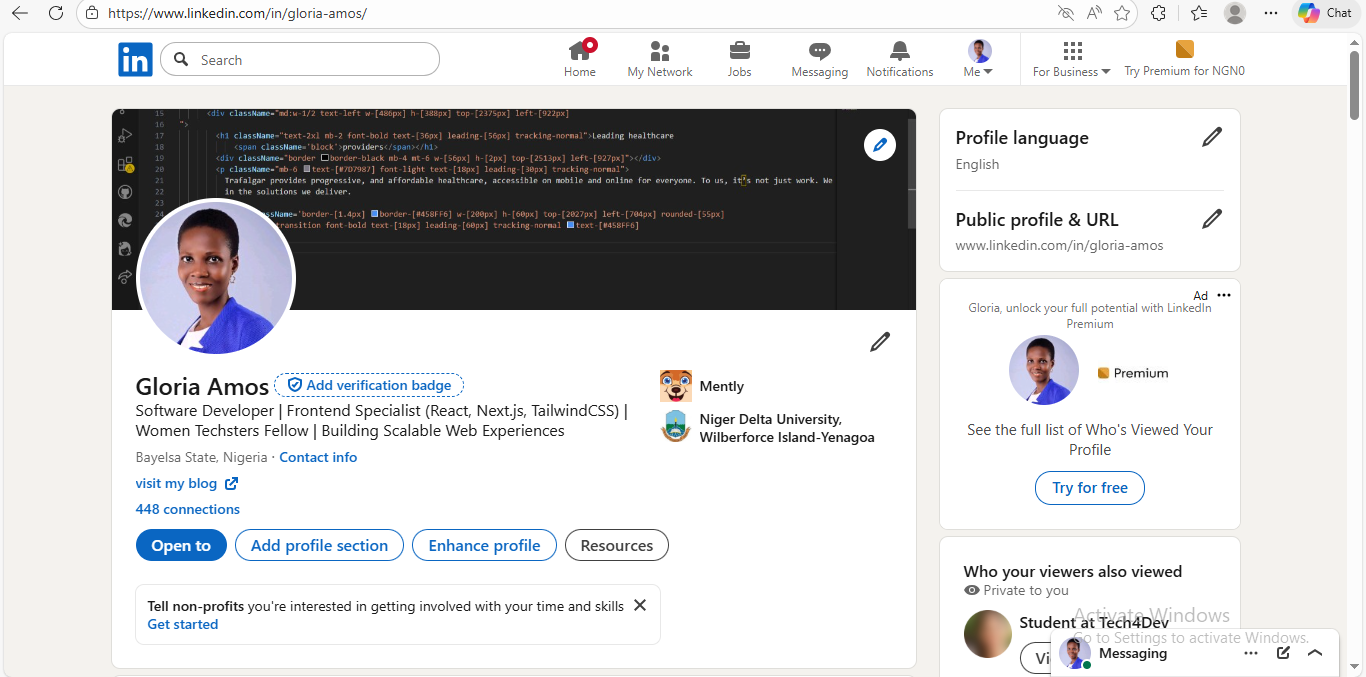
Write a Compelling, Narrative-Driven About Section
The About section is where you tell your story: your journey, skills, and goals. Personalization is key to standing out. Write your About section in a narrative style to engage visitors.
Tips:
Start with a hook: Catch attention right away with a compelling opening line.
Show your achievements: Highlight milestones or key accomplishments that reflect your expertise.
Humanize your story: Include your passions, hobbies, or motivations that give a personal touch.
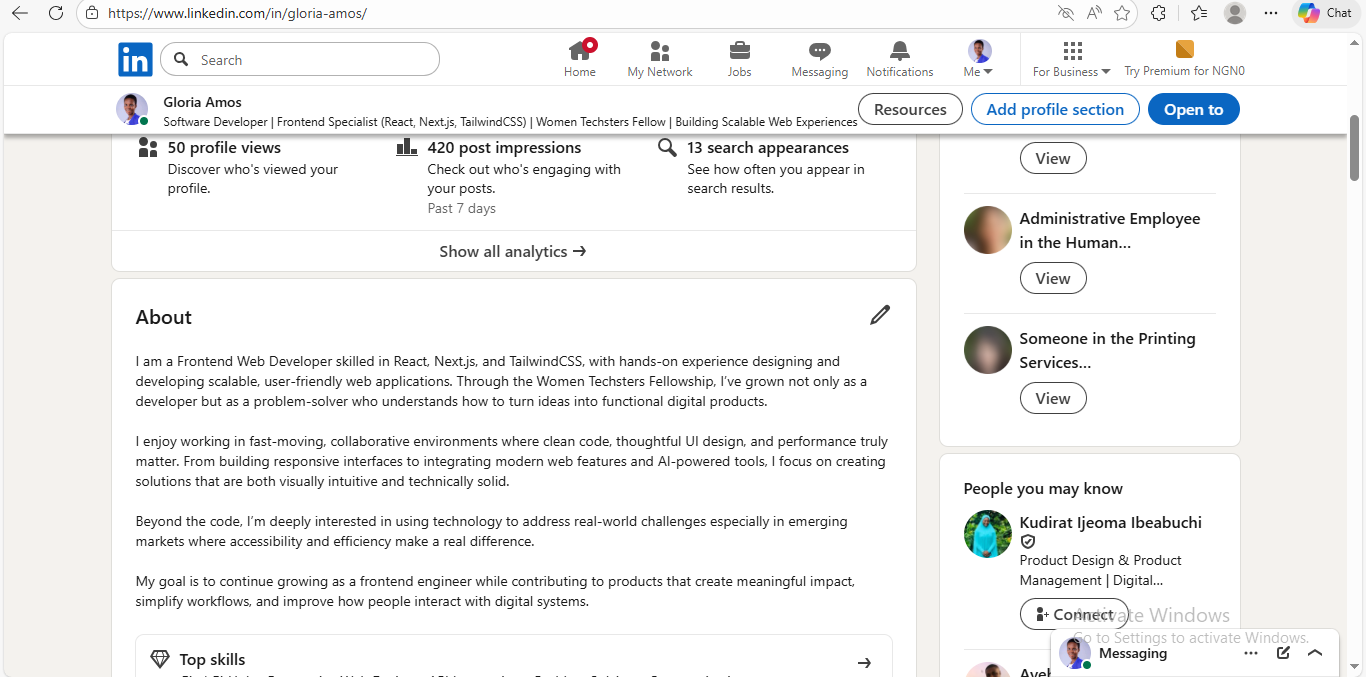
Example 1: General Medical / Health Professional
I didn’t choose healthcare by accident; I chose it because I saw firsthand what it means when care is missing, delayed, or misunderstood. That experience shaped my commitment to patient-centered care and clinical excellence.
Over the years, I have built strong experience in patient care, clinical support, and health documentation, collaborating daily with multidisciplinary teams of nurses, physicians, and allied health professionals. I have supported the care of over 1,500 patients, maintained 95%+ accuracy in medical records, and contributed to reducing documentation errors by 30% through improved record-keeping practices.
I am especially passionate about preventive care, patient education, and digital health tools that make healthcare more accessible and efficient. I have participated in health education programs that reached 300+ patients, helping improve medication adherence and awareness of chronic disease management. I have also supported the implementation of digital health workflows that shortened patient processing time by 20%, improving overall service delivery.
Whether I’m assisting patients, managing medical records, or supporting clinical workflows, my focus remains the same: ensuring every patient feels seen, heard, and properly cared for.
Outside work, I engage in continuous professional development, volunteer in community health initiatives, and explore innovative digital health solutions for underserved populations.
My goal is to contribute meaningfully to healthcare systems that truly put people first and deliver measurable impact.
Example 2: Tech / Data Scientist
My journey into data science began with curiosity and grew into a mission to use data for better decisions. I’ve since built data-driven solutions that translate complex information into practical insights.
Today, I work with modern analytics and machine learning tools to clean, model, and analyze data for real-world impact. I have processed and analyzed datasets of 50,000+ records, built predictive models that improved decision accuracy by 25%, and developed dashboards that reduced reporting time by 40% for stakeholders.
I’m particularly interested in machine learning, statistical analysis, and data systems that empower organizations especially in emerging markets where data can drive efficiency, growth, and sustainability.
When I’m not working with data, I experiment with new models, learn emerging tools, and find better ways to communicate insights clearly to non-technical audiences.
My long-term goal is to build intelligent data products that solve real problems and make analytics more accessible.
Harnessing the Power of LinkedIn’s Featured Section
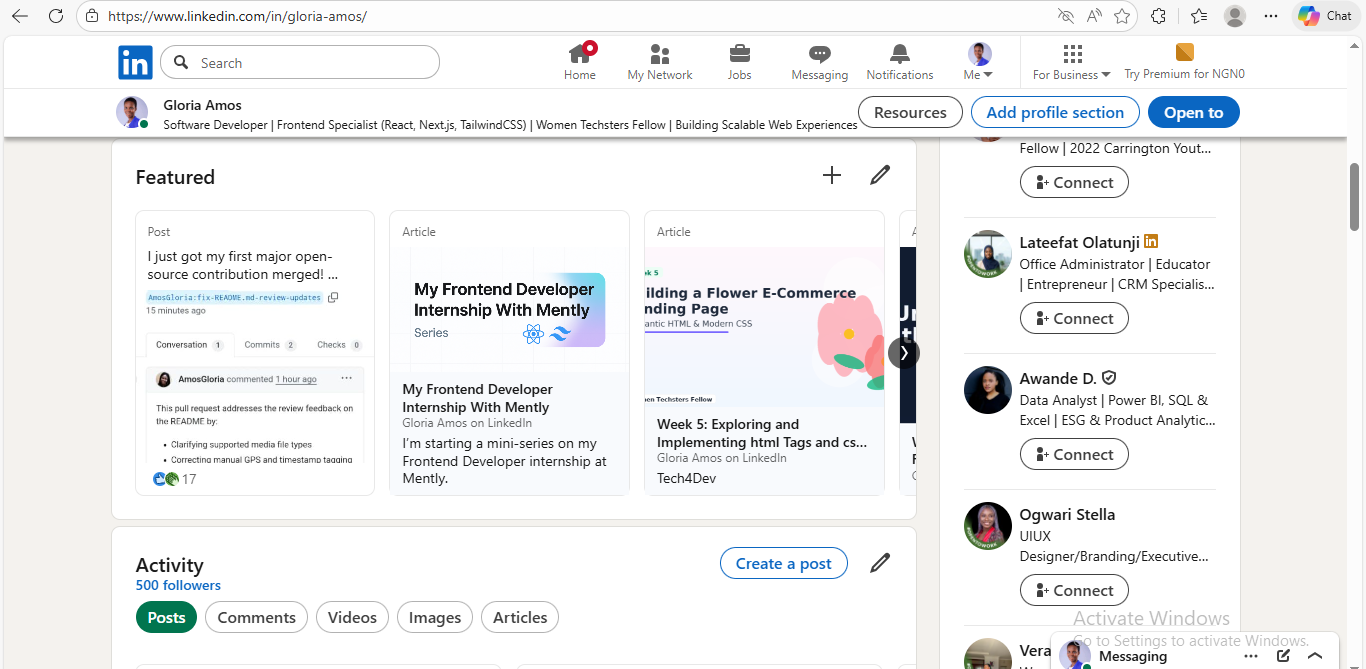
While your headline, summary, and experience tell your story in words, your Featured section tells it visually and credibly. Think of this space as your personal showcase, a curated display of your best professional evidence rather than a random collection of links.
Many professionals leave this section empty or cluttered. However, when used strategically, it can become one of the most persuasive parts of your profile, helping recruiters, collaborators or clients quickly understand your value within seconds of landing on your page.
What to Feature (Quality over Quantity)
Your Featured section should not be a storage room; it should be a gallery. Aim to highlight three to five strong pieces of work, such as:
A deployed project or portfolio
A published article or thought leadership post
A major certification or award
A case study or impactful achievement
A demo, prototype, or research output
Each item should clearly demonstrate your skills, impact or growth.
How to Add Items to Your Featured Section
To populate this section effectively:
Navigate to your LinkedIn profile
Scroll down to the Featured area
Click “Add featured”
Choose one of the following options:
Post
Link
Media
Article
Add a concise, compelling description that explains why the item matters
Write Captions that Sell Your Value
Do not simply attach a link, contextualize it. For example:
“Designed and deployed a learning dashboard using React and Tailwind that improved student engagement by 40%.”
“Completed an advanced frontend certification with real-world, production-level projects.”
“Published an article on optimizing professional branding that helped 200+ early-career professionals refine their profiles.”
Strong captions transform ordinary links into powerful credibility signals.
Arrange Your Best Work Strategically
Your most impressive item should always appear first, as this is what visitors will see immediately. Place certificates or secondary materials later and avoid featuring anything outdated or low quality.
Keep It Fresh
Your career evolves; your Featured section should too. Make it a habit to update it every three to six months, or whenever you complete a meaningful project, publish new work, or reach a milestone.
When done right, this section becomes more than decoration; it becomes proof of competence, consistency, and professionalism.
Leverage Your Experience with Rich Media
For each job or experience listed in your profile, don't just list duties, show how you contributed and the impact you had. Use rich media like presentations, images, and videos to make your experience stand out visually.
Tips:
Add project links, case studies.
add description of work done during the time working for the organization.
5. Showcase Your Skills & Endorsements
Skills are the building blocks of your profile and having them validated by others add credibility. Focus on relevant and evolving skills that align with future trends in your industry.
Tips:
Prioritize hard skills (e.g., data analysis, coding) and soft skills (e.g., leadership, communication).
Request endorsements from colleagues and clients for key skills but avoid asking for endorsements from people who don’t truly know your work.
6. Ask for Recommendations
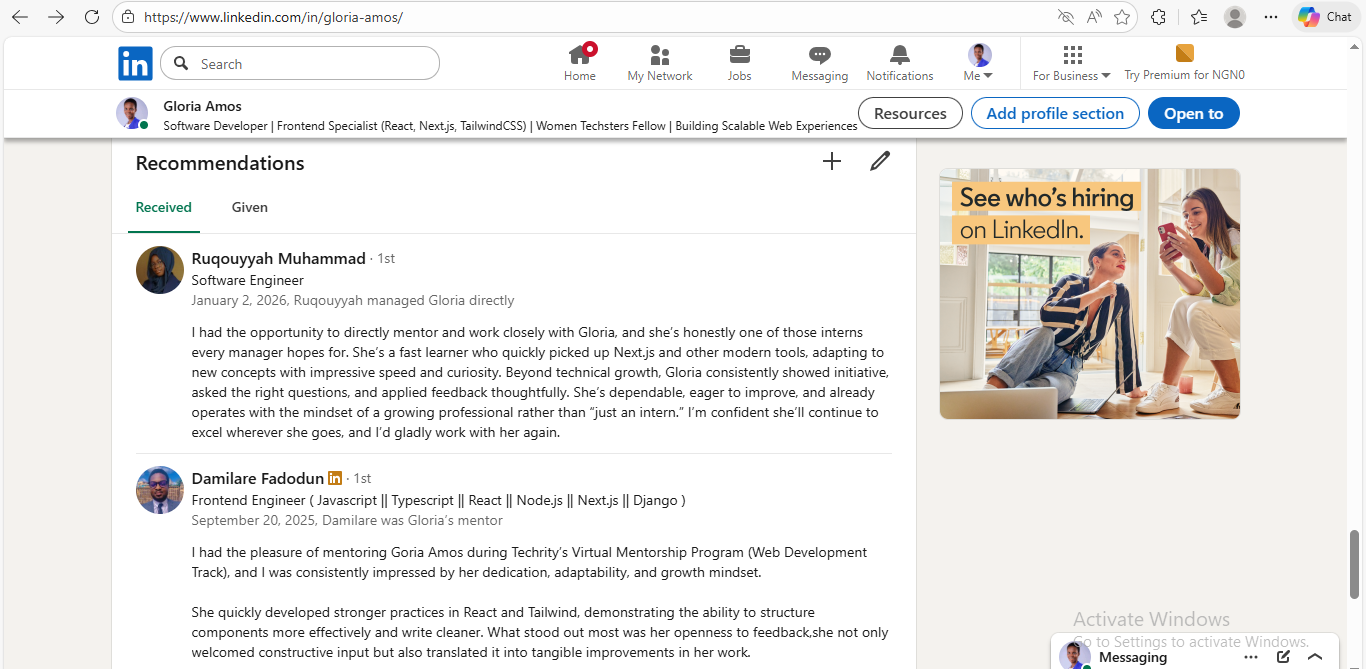
Recommendations hold a lot of weight; they give prospective employers or clients a clear insight into your working style and value. Be sure to ask for recommendations or testimonials from colleagues, managers, or clients that speak to your work ethic and accomplishments.
Tips:
Personalize your request: Instead of a generic “recommend me”, explain why you’d appreciate the recommendation and how it could help you.
Provide context about what you’d like them to focus on, whether it's your technical abilities, leadership, or creativity.
Engage with Content and Be Active
LinkedIn is not just a resume; it’s a social platform for professionals. Regularly posting updates, engaging in discussions, and sharing relevant content helps you stay visible and build your personal brand. Make it a habit to follow up on meetings, events, and meaningful conversations with a LinkedIn connection request. This simple practice helps keep your network active, relevant, and continuously growing.
Before reaching out to anyone, take a moment to review the person’s LinkedIn profile. Look for shared interests, career paths, or experiences that can help you craft a thoughtful and personalized message. A well-considered introduction shows professionalism and demonstrates genuine interest in building a meaningful connection.
When starting a conversation, be clear about how you want to present yourself, what value you can share, and what you hope to gain from the interaction. Preparing a few simple, relevant questions can help uncover common ground and create more engaging discussions.
Approaching networking with intention not only helps you stand out but also lays the foundation for long-term professional relationships built on trust and mutual value.
Tips:
Post industry-related articles, personal experiences, or thoughts on the latest trends.
Engage with others: Like, comment, and share posts that resonate with your career goals and values.
Use LinkedIn’s video feature to create short, engaging clips about your expertise or lessons learned.
Update Your LinkedIn URL
Customizing your LinkedIn URL is one of the simplest yet most powerful ways to give your profile a more professional and polished look. People are starting to expect this basic step for credibility.
Tips:
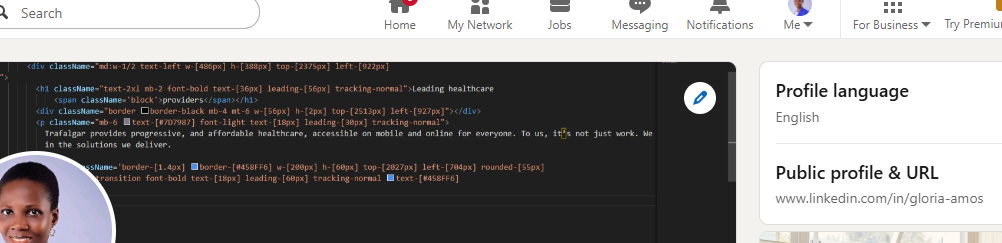
Edit your LinkedIn URL to reflect your name or personal brand (e.g., linkedin.com/in/gloria-amos).
This makes your profile easier to share and gives it a more polished and professional appearance.
Use LinkedIn Features for Job Seeking
LinkedIn’s "Open to Work" and "Job Preferences" features have evolved and can be invaluable when searching for opportunities in 2026.
Tips:
- Update your job preferences to match the type of work and industries you’re targeting.
Stay On Top of Industry Trends
Since the professional landscape is constantly changing, your LinkedIn profile should evolve with it. LinkedIn profiles are becoming more interactive and dynamic with new updates and features.
Tips:
Follow thought leaders and companies in your industry to stay informed.
Regularly update your skills and experience as new trends, tools, or certifications become relevant.
Showcase Your Credentials
Licenses and certifications are a powerful way to signal credibility, expertise, and commitment to continuous learning on LinkedIn. They provide visible proof of your skills and professional development beyond what your job titles alone can communicate.
To add them to your profile, click on the “Add profile section” button beneath your name, scroll to the Recommended section, and select “Add licenses & certifications.”
As you type the name of the issuing organization, be sure to select it from LinkedIn’s dropdown list rather than typing it manually. This automatically links your credential to the organization’s official LinkedIn page, allowing viewers to click through, verify your certification, and explore the issuing body.
For instance, when you complete a course on LinkedIn Learning, you can add your certificate directly from the Learning History section of your account. From there, you also have the option to share your achievement with your network turning your learning into a visibility and credibility boost.
Strategically displaying certifications not only strengthens your profile but also positions you as a proactive professional who invests in growth and expertise.
Share any projects, patents, and publications
Within the “Add profile section” button, you also have the option to add details on any projects, patents, or publications you’ve worked on or earned. This can add an extra dimension to your profile and help people understand what makes you tick. It not only differentiates you but demonstrates passion and commitment as well.
Share relevant content from your LinkedIn feed
It’s one thing to have a network of connections on LinkedIn; it’s far better to have an active role in that network, appearing in your connections’ LinkedIn feeds in a way that adds value for them. Sharing relevant content with your network is one of the most accessible ways of doing this. You can make a start by keeping a close eye on your LinkedIn feed and sharing content or commenting on content that you have a perspective on.
Conclusion
In this article, you learnt about setting up your linkedIn profile and steps that make you more visible. By following the smart strategies in this guide, you'll stand out in a competitive market and be ready to take full advantage of LinkedIn’s powerful networking tools.
you can find me on LinkedIn: Gloria Amos | LinkedIn and X: Amos Gloria (@AmosGloria11) / X
About the author
- Gloria is a passionate web developer with a strong drive for creating intuitive, dynamic, and responsive web applications. Always eager to learn new technologies and improve coding skills, Gloria is dedicated to building seamless user experiences through clean and efficient code. Stay tuned for insights and tips on web development, shared from a developer’s perspective.
Comments
Join the discussionNo comments yet. Be the first to comment.


